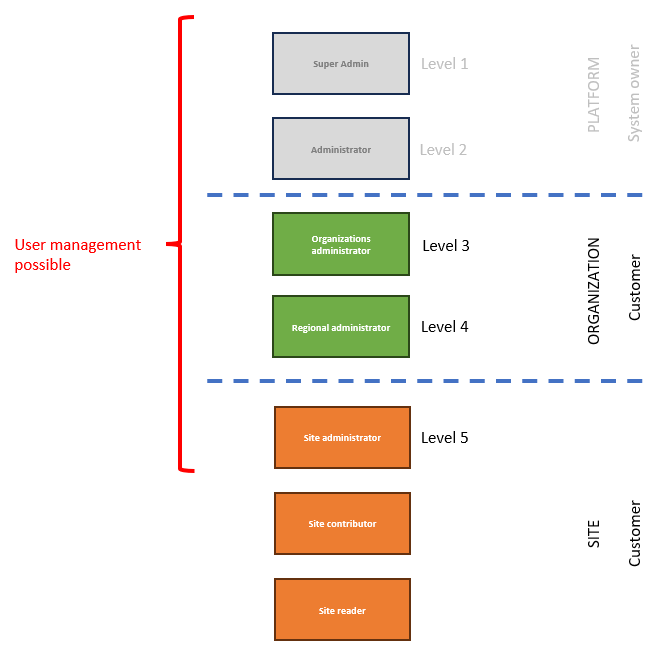
What you can see and do in eLandfill depends on your role. An administrator gives you a role for one site or for a whole organisation. You can have different roles on different sites.
Every role has a level. A lower number means more rights. Level 1 can do everything; level 7 mostly views.
You can never give someone a role at your own level or above it. For example, a site admin (level 5) can give the Site contributor and Site subscriber roles, but cannot make someone else a site admin.
| Role | Level | What it covers | What you can do |
|---|---|---|---|
| Organisation admin | 4 | Every site of the organisation, and its people | Manage every site in the organisation. Add people, give them access to the organisation's sites, and switch their accounts on or off. |
| Site admin | 5 | The site's settings and who can use it | Change the settings of the sites you administer. Give people the Site contributor or Site subscriber role on those sites, and remove it. Record and edit the site's data. |
| Site contributor | 6 | Records and edits the site's data | Add and edit the site's data, for example assets, readings and imports. No access to administration. |
| Site subscriber | 7 | Sees the site's data without changing it | View the site's maps, data and reports, and use the Inspect module. You cannot change assets or measurements, import data or export it. |
A site admin cannot add or remove another site admin, and cannot switch accounts on or off. Ask your organisation admin to do that.
Two roles above these are held only by ReSource staff, who run the platform:
Contact ReSource if you need a new organisation or something your organisation admin cannot do.
When you get access to a site, you get the modules that site has. An administrator can switch off add-on modules for you afterwards.