The flare page shows the state of your site's gas flare: whether it is sending data, whether the flame is burning, and how its readings change over time.
It only appears on sites where a flare controller is connected to eLandfill. Its item in the Gas top bar carries the flare's own name. On the Demo Site it is LC500 (demo).
¶ Status
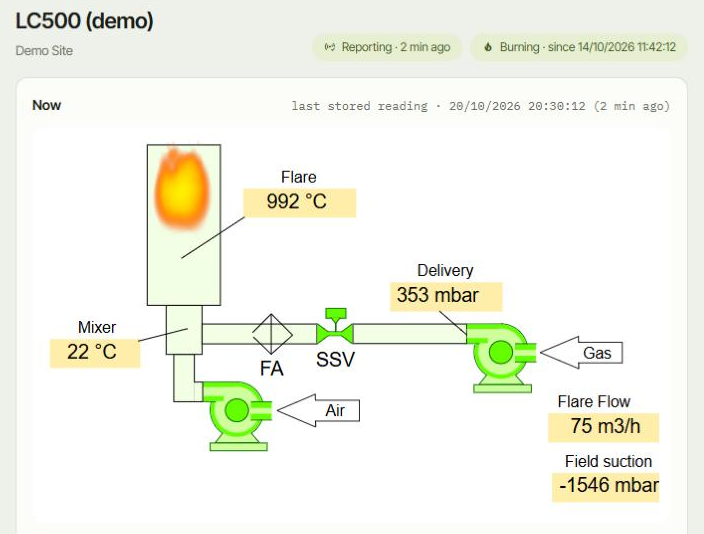
Two labels next to the page title sum up the flare:
- Reporting, with the time since the last reading, for example "Reporting · 2 min ago". If the flare stops sending data, it shows Not reporting since and a time.
- Burning, with the time the flame was lit, for example "Burning · since 14/10/2026 11:42:12". If the flame goes out, it shows Flame out since and a time.
¶ Now
The Now card shows a diagram of the flare with its current values written on it: the flare temperature, the mixer temperature, the delivery pressure, the flare flow and the field suction.
The diagram follows the gas from the right to the left: the gas comes in from the field, the booster sends it through the safety shut-off valve (SSV) and the flame arrester (FA) to the Mixer, where the fan adds Air, and it burns in the Flare.
The line at the top of the card says whether the values are live or the last stored reading, with its time.
The Reading list next to the diagram shows every value of that reading, with the names the flare controller uses. On the Demo Site, for example:
- Fan speed and Booster Speed, in %.
- Fl.Flow: the gas flow to the flare, in m³/h.
- Field.Suction and Delivery Pressure, in mbar.
- Fl Temperature and Mixer Temperature, in °C.
- Gas.Detector: the gas detector, in %LEL.
- Fl Burn Time: the flare's total burning hours.
- The bearing and booster outlet temperatures.
Date and Time at the top of the list come from the flare controller's own clock.
¶ History
The History card shows a chart and a table of past readings. The number at the top right is how many readings the flare has stored.
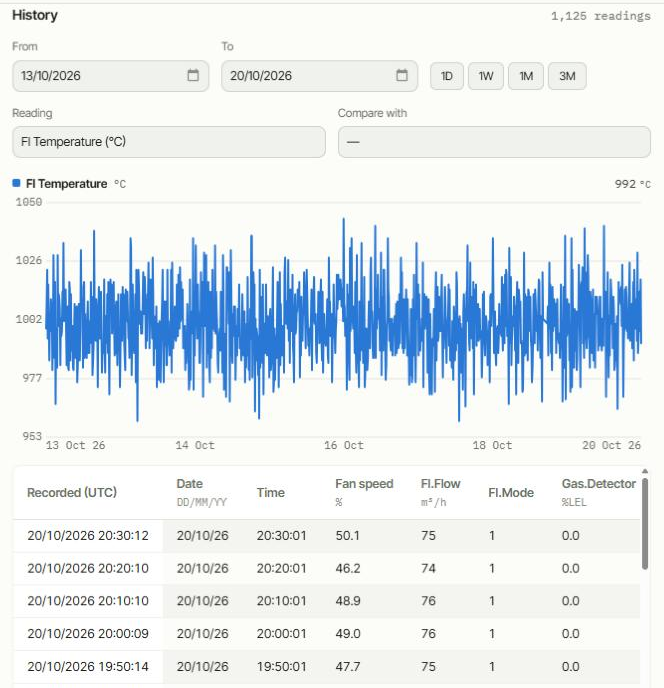
- From and To set the period. 1D, 1W, 1M and 3M set the last day, week, month or three months. The page opens on the last week.
- Reading: the value to plot.
- Compare with: add a second value to the chart. Choose — to remove it.
- The number at the top right of the chart is the latest value.
The table lists the readings, newest first, with one column per value.
- Recorded (UTC) is when eLandfill stored the reading, in UTC.
- Date and Time are the flare controller's own clock, which may be in local time.
¶ If something looks wrong
- Not reporting since…: eLandfill has not received data from the flare since that time. Check the flare's power and connection on site, or contact us.
- Flame out since…: the flare reports that the flame is out. Check the flare on site.
- The page says there is no flare on the site: no flare controller is connected to this site.
See also: Gas module.